Code Agents in the IDE? Yes please!


** This is an old post that I transferred from my old blog website. This was the status around late 2025. I will make a new post about the recent updates with Claude Opus 4.6, gpt-codex 5.3 and agentic fleets **
Why now?
We finally have real competition in IDE code agents! I’ve been using ChatGPT models for a few years now (since 2020) with a Plus subscription on the desktop app and on my phone. It works for most stuff and now with GPT-5 it’s been incredible for coding, but context-juggling is an issue. You bounce between your IDE and a chat window, copy and pasting files, code segments and logs back and forth.
In my opinion, every developer can benefit from using a coding agent nowadays. I'll take you through what I've been recently using and you can pick something to try for yourself if you want.
My Setup
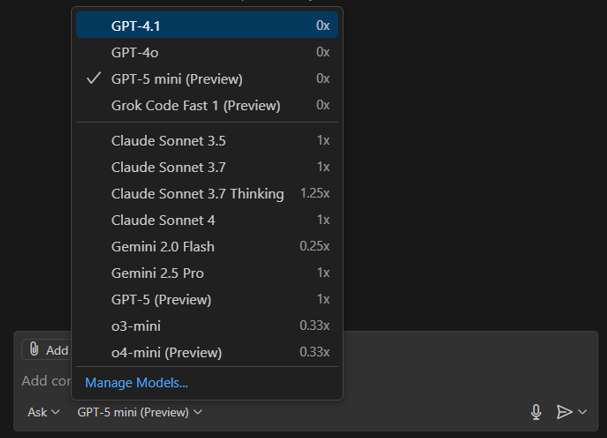
I am a VS Code IDE user. Over the last year I also started using GitHub Copilot, an AI coding assistant inside VS Code. With my university email I get Copilot Pro (normally ~$10/month) for free. This lets me use chat/agent mode with different models like Claude Sonnet 4, Gemini 2.5 Pro, and recently GPT-5.
Apply here if eligible:
Copilot-Student
Since GPT-5 landed this month, Copilot’s agent mode became much better and my default. Claude Opus 4.1 sits behind Pro+ ($39/month), so before GPT-5 I mostly compared Claude Sonnet 4, GPT o3-mini-high and Gemini 2.5 Pro.
With GPT-5 on Copilot I became far more productive — until I hit Copilot’s monthly limit within two weeks. Time to diversify.
I ended up running three agents: Gemini CLI, Codex, and GitHub Copilot.
I only pay for ChatGPT Plus (~€21/month).
Side note on Claude Code CLI:
I’ve bounced between subscriptions over the years (ChatGPT, Gemini, Claude). Claude’s limits were a constant issue and I’ve seen reports of people racking up high bills. I already liked GPT for daily work and used Claude Sonnet 4 only inside Copilot — so I skipped Claude Code.
Let’s look at the three agents I actually use.
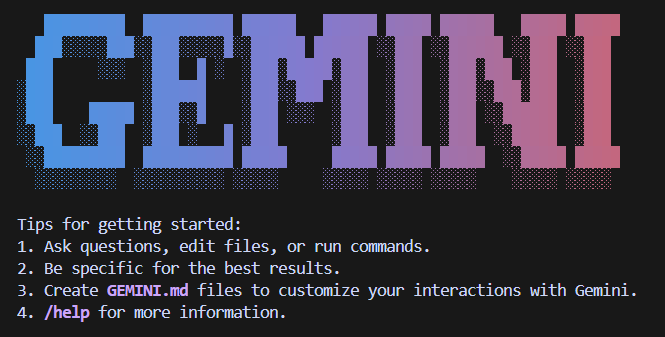
Gemini CLI + VS Code “Gemini CLI Companion”
What it is: Gemini’s open-source terminal AI agent. Launched June 25, 2025. Free, open, moving fast. Rough start, but improving quickly.
Gemini CLI announcement:
https://blog.google/technology/developers/introducing-gemini-cli-open-source-ai-agent/
Key points:
• Generous free tier with personal Google account: 60 requests/min and 1,000/day
• Access to Gemini 2.5 Pro with a 1M-token context window
• Fully open source with frequent releases
• New VS Code companion extension with inline diffs and editor awareness
How I’m using it:
I keep Gemini CLI as my third option. I reach for it when Copilot/Codex quotas hit or when I’m working in a huge codebase where the 1M context shines.
Docs:
https://github.com/google-gemini/gemini-cli/blob/main/docs/cli/index.md
OpenAI Codex CLI (now with IDE integration)
Where it started:
Codex Web launched in May 2025 with cloud sandboxes connected to GitHub repos. Interesting idea, but unusable for me due to HPC environment friction.
OpenAI post:
https://openai.com/index/introducing-codex/
What changed:
• Codex CLI now runs locally and is included with ChatGPT Plus
• Native IDE extensions for VS Code, Cursor, Windsurf
Codex CLI:
https://github.com/openai/codex
IDE integration:
https://openai.com/codex/
Usage limits (Plus):
OpenAI doesn’t publish a hard cap, but guidance suggests roughly 30–150 local messages per 5 hours, with an undisclosed weekly limit.
Help Center:
https://help.openai.com/en/articles/11369540-codex-in-chatgpt
How I’m using it:
Running it in parallel with Copilot and seeing which becomes my main workflow.

GitHub Copilot
This has been my primary coding agent the longest. Big strength: multi-model support across vendors with a clean UX and agent mode.
https://github.com/features/copilot
Plans & limits (individuals):
• Free: 2,000 completions/month + 50 premium requests
• Pro: Unlimited completions + ~300 premium requests/month (free for students)
• Pro+: 1,500 premium requests/month + full model access
Models:
Switch models per chat or completion (GPT-5, Claude Sonnet 4, Gemini 2.5 Pro, etc.).
Context windows:
Context depends on client and model. For example Copilot Chat had 64k with GPT-4o even when the model supported more. Don’t assume max context carries over.
References:
https://github.blog/changelog/2024-12-06-copilot-chat-now-has-a-64k-context-window-with-openai-gpt-4o/
https://github.com/openai/codex/issues/2002
How I’m using it:
Still my main coding agent. I mix fast models for unlimited completions with bigger ones for premium requests. Codex + GPT-5 is now in heavy rotation too.
Comparative reflection (when I reach for which)
• Gemini CLI + Companion
Huge context and generous free tier. Perfect backup and great for large repos.
• Codex
Already included with ChatGPT Plus. GPT-5 locally has been excellent.
• Copilot
Best multi-model flexibility and free Pro for students. Caveat: big context windows don’t fully translate inside Copilot.
Conclusion
• Agents inside the IDE massively boost productivity — but only if you scope prompts carefully and review diffs. They still love replacing giant chunks of code.
• I’ll keep using all three: mainly Codex and Copilot, with Gemini CLI as my flexible third option.
• Works smoothly on Windows and WSL.
• All support project-aware config files, though I prefer planning in chat and making small targeted edits.
• I haven’t explored MCP server integrations yet.
If project-aware configs or MCP servers significantly boosted your workflow, feel free to share useful use-cases.
I’ll keep experimenting with these agents and see where it lands. If this pushed you to try one, the post did its job.